How to Change Your Address on Your PAN Card Online (Step-by-Step)
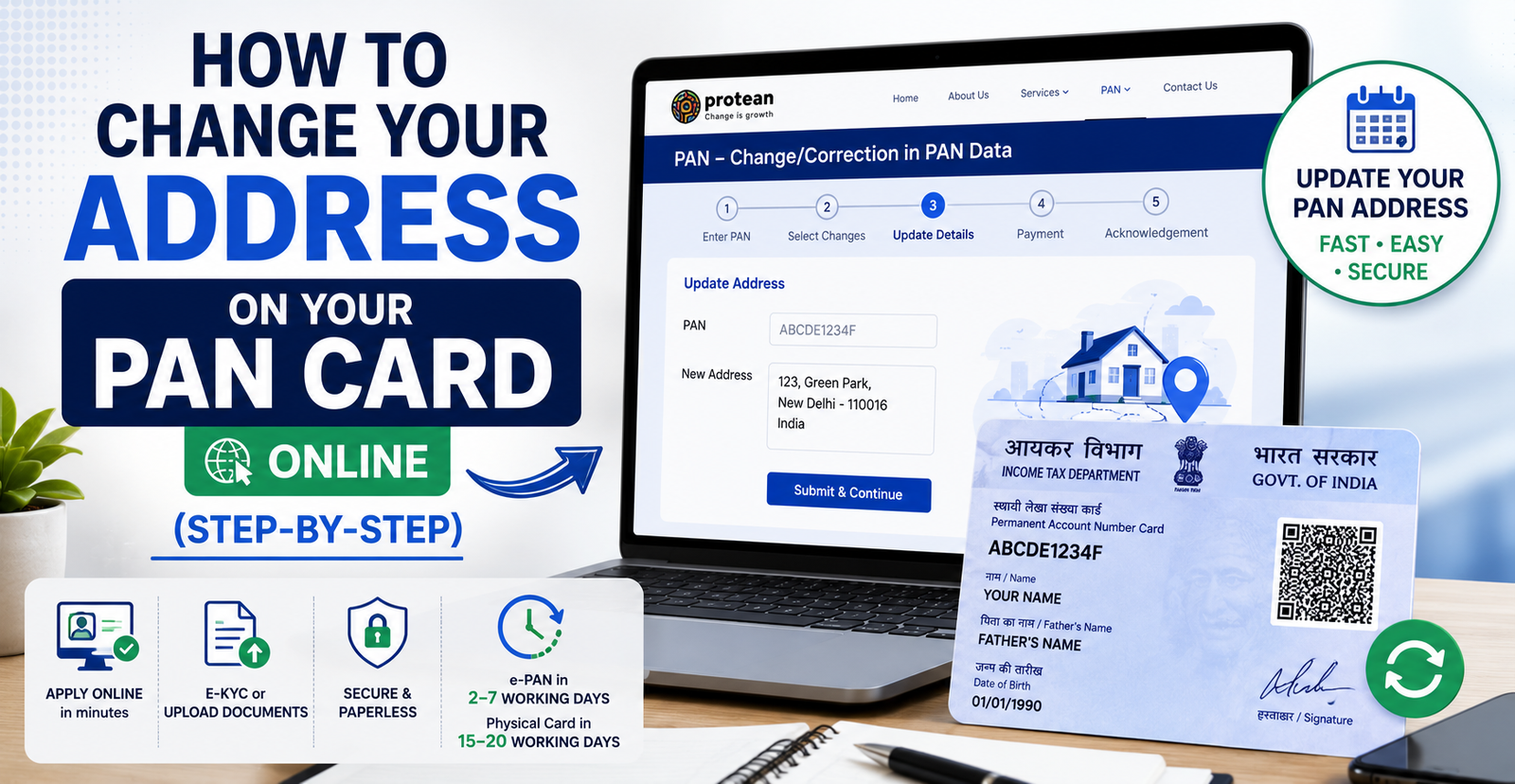
How to Change Your Address on Your PAN Card Online (Step-by-Step). Your PAN card itself doesn’t display an address, but the address linked to your PAN record matters a lot it affects where your physical card is delivered, how your KYC is verified, and whether tax department communications reach you. Here’s exactly how to update it online in 2026.
Log into the Protean (NSDL) or UTIITSL PAN portal, select “Change/Correction in PAN Data,” update your address using either Aadhaar-based e-KYC (fastest, no documents needed) or manual entry with address proof, pay the applicable fee, and submit. The e-PAN with your updated address is typically available within 2–7 working days, and the physical card follows in 15–20 working days.
Why Keeping Your PAN Address Updated Matters
- Prevents your physical PAN card from being delivered to the wrong address
- Avoids KYC mismatches when opening bank accounts, applying for loans, or investing
- Ensures income tax notices and refund-related communications reach you
- Keeps your PAN details consistent with your Aadhaar and other official records
Two Ways to Update Your Address
There are two routes, and which one you use makes a big difference in speed and paperwork:
| Method | What It Requires | Speed |
|---|---|---|
| Aadhaar-based e-KYC (paperless) | Your Aadhaar-linked mobile number for OTP verification | Fastest no documents to upload; e-PAN often ready in 2–7 working days |
| Manual entry with documents | Scanned/physical proof of your new address | Slower physical card typically takes 15–20 working days |
If your Aadhaar already has your current address, the paperless e-KYC route is by far the easiest option, since the system pulls your details directly from Aadhaar without requiring you to upload separate proof.
How to Change Your Address via Protean (NSDL) Step-by-Step
- Visit the official Protean eGov Technologies (formerly NSDL) website.
- Under the PAN section, click “Apply” under “Change/Correction in PAN Data.”
- From the Application Type dropdown, select “Changes or Correction in existing PAN data.”
- Select the correct applicant category (Individual, HUF, Company, etc.).
- Enter your name, date of birth, email address, and mobile number, then submit.
- Note the token/reference number displayed you’ll need this to continue your application later if needed.
- Enter your existing PAN number, and choose whether to submit documents physically or complete the process paperlessly using Aadhaar e-KYC.
- If using Aadhaar e-KYC: verify via OTP sent to your Aadhaar-linked mobile number your new address will be pulled directly from your Aadhaar record.
- If submitting manually: enter your updated address details and upload scanned proof of the new address.
- Review all details carefully, then proceed to payment.
- Pay the applicable fee via debit/credit card, net banking, or demand draft.
- Download and save your acknowledgement receipt with its 15-digit number.
- If you opted for the physical/document route, print the acknowledgement, sign it, attach self-attested documents, and post it to the Protean processing address within 15 days of the acknowledgement date.
How to Change Your Address via UTIITSL Step-by-Step
- Visit the official UTIITSL PAN portal.
- Click “Apply” under “Change or Correction in PAN Card.”
- Select “Apply for Change or Correction in PAN Card Details.”
- Enter your PAN number and select your document submission mode (paperless Aadhaar e-KYC or physical documents).
- Note the reference number displayed on screen.
- Select the “address” field under correction items, and enter your updated address details.
- If using Aadhaar e-KYC, confirm the address as shown in your Aadhaar record, then enter your mobile number and email ID.
- Upload any required supporting documents if you’re using the manual route.
- Review your application and proceed to payment.
- Pay the applicable fee and download your acknowledgement receipt.
- If submitting physically, post the signed acknowledgement with self-attested documents to the UTIITSL address specified on the portal.
Documents Required (For the Manual Route)
If you’re not using Aadhaar-based e-KYC, you’ll need to provide proof of your new address. Commonly accepted documents include:
| Document Type | Examples |
|---|---|
| Utility bill | Electricity, water, gas, or landline bill (recent) |
| Bank account statement | Recent statement or passbook showing the new address |
| Government-issued ID | Aadhaar, Voter ID, Passport, Driving License with the new address |
| Rent agreement | Registered rent agreement, if applicable |
| Employer certificate | For salaried individuals whose address is verified via employer, in specific cases |
Non-citizens can present a valid passport, PIO card, or OCI card as address proof where applicable.
Fees for PAN Address Change
| Communication Address | Fee |
|---|---|
| Indian address | ₹50 |
| Foreign address | ₹959 |
Fees are inclusive of GST and cover both processing and dispatch of the updated card no separate delivery charge applies afterward. Always confirm the current fee on the official Protean or UTIITSL portal before paying, since amounts are revised periodically.
Processing Time
Processing time can vary depending on the application method and verification. Check your application status using the acknowledgement or reference number provided after submission.
Tracking Your Address Update Application
Via Protean (NSDL):
- Visit the NSDL PAN status tracking page.
- Select “PAN – New/Change Request” as the application type.
- Enter your 15-digit acknowledgement number and captcha, then submit.
Via UTIITSL:
- Visit the UTIITSL Track PAN page.
- Enter your application coupon number or PAN and date of birth.
- Complete the security check to view your current status.
Via SMS: Send NSDLPAN <15-digit acknowledgement number> to 57575 to receive a status update by text message.
Does Updating Aadhaar Automatically Update My PAN Address?
Not automatically in all cases, but if your PAN is linked to Aadhaar and you choose the Aadhaar-based e-KYC route during your PAN correction, the system pulls your current address directly from Aadhaar. Because of this, many people find it faster to first update their address in Aadhaar, then run the PAN correction using the e-KYC option this avoids the need to separately upload address proof documents for the PAN update.
Common Mistakes to Avoid
- Assuming the physical PAN card displays an address it doesn’t; only your PAN record with the department holds your current address.
- Submitting documents that don’t clearly show your name and new address together.
- Choosing the manual/document route when Aadhaar e-KYC would have been faster and required no paperwork.
- Forgetting to post signed documents within the required window (commonly 15 days from the acknowledgement date) when using the physical submission route.
- Letting a mismatch persist between your Aadhaar and PAN address, which can now cause additional friction under the 2026 verification rules.
FAQs
Is Aadhaar mandatory to change my PAN card address? No, but having Aadhaar makes the process much faster through the paperless e-KYC route. Without it, you’ll need to submit the manual application with supporting address proof documents.
How long does a PAN address update take? Around 2–7 working days for the e-PAN if you use Aadhaar-based e-KYC, and 15–20 working days for the physical card to arrive by post.
Can I request the updated card be delivered to a different address than my new PAN address? Yes some applications allow you to specify a separate delivery address distinct from the address being updated on your PAN record. Check this option carefully during the application.
Does my PAN number change after an address update? No. Your PAN number remains exactly the same for life only the address on record and the reissued physical card change.
What happens if I don’t update my PAN address after moving? You risk missed income tax communications, PAN cards being delivered to an old address, and KYC mismatches during banking or investment processes.
Can NRIs update their PAN address to a foreign address? Yes, NRIs can update their communication address to a foreign address using the same correction process, with the applicable foreign-address fee.
Is there a difference in process for HUF, companies, or NRIs? The core address update process is broadly the same across categories, though the applicant category selected during application, and the exact documents required, will differ accordingly.
Conclusion
Updating your PAN card address is a quick, largely painless process, especially if your Aadhaar is already up to date the paperless e-KYC route can have your e-PAN ready in under a week with no documents to upload. If you go the manual route, just make sure your address proof clearly matches your name, and keep your acknowledgement number handy to track progress until the updated card arrives.