PAN Card Status Check: Track Your PAN Application Online, SMS & Call
In this guide, you will learn how to check your PAN card status online and offline through official platforms such as the NSDL (Protean) portal, UTIITSL website, and the Income Tax e-Filing portal. You can track your application using your acknowledgement number, PAN number, Aadhaar number, or even your name and date of birth.
We also explain how to check PAN status through SMS services and customer support, so you can track your application quickly and securely.
What is a PAN Card?
PAN Card (Permanent Account Number) is a financial identity document issued by the Income Tax Department of India. It contains a unique 10 character alphanumeric number used to identify individuals and organizations in the tax system. The main purpose of a PAN card is to track income, monitor financial transactions, and prevent tax evasion. A PAN card is required for important activities such as filing income tax returns, opening bank accounts, applying for loans, investing in financial schemes, and making high value transactions. It also works as an identity proof and includes details like the cardholder’s name, date of birth, signature, and a QR code for verification. Once issued, a PAN card remains valid for a lifetime and can be applied for by individuals, companies, and other entities.
How to Check PAN Card Status Online
Below are the different methods to track your PAN card status online. You can now track your PAN card status using your favorite method.
PAN Card Status Check using Acknowledgement Number Through NSDL Website
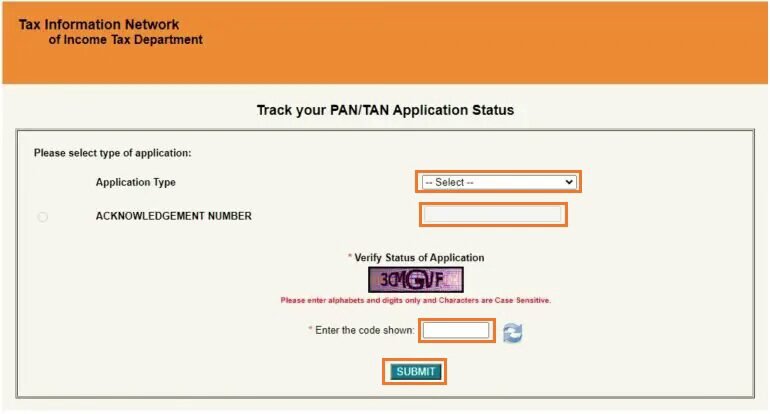
Visit the official NSDL (Website) PAN status tracking page: “Track Your PAN/TAN Application Status”.
From the Application Type section, select “PAN – New/Change Request”.
Enter your 15-digit acknowledgement number in the required field.
Type the captcha code shown on the screen for verification.
Click the “Submit” button to view your PAN card application status instantly.
PAN Card Status Check without Acknowledgement Number Through NSDL Website
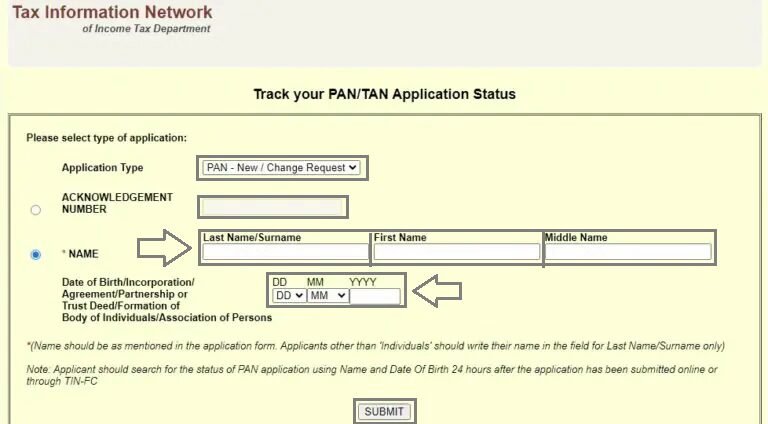
To check your PAN card status without an acknowledgement number, visit the official NSDL portal and open the “track your Pan/Tan Application Status” page.
Select “Pan New/Change Request” under Application Type, then choose the “Name” option.
Enter your full name and date of birth exactly as provided in your PAN application form.
After verifying the details carefully, click “Submit” to view your current PAN card application status. Always ensure you are using the official portal for secure tracking.
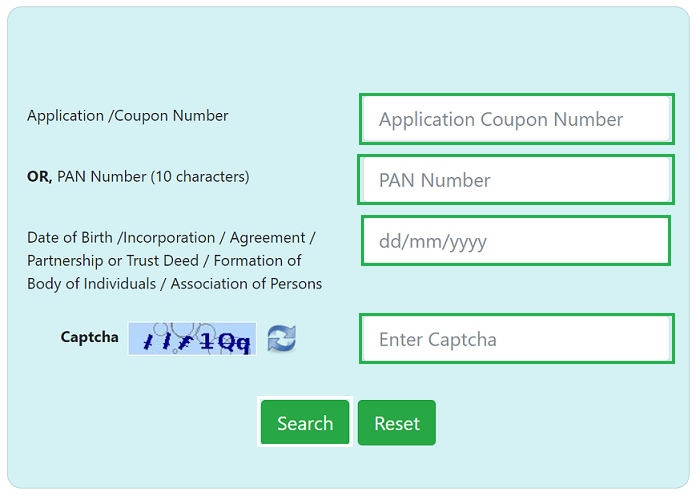
PAN Card Status Check by PAN Number / Coupon Number on UTI Website
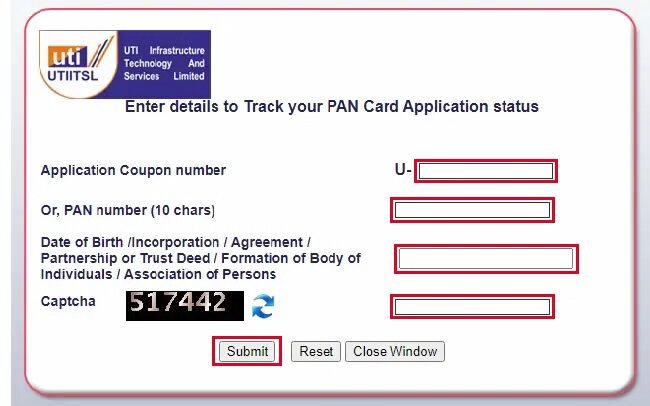
Enter your application coupon number or PAN number in the required field.
Provide your Date of Birth, Incorporation, or Agreement details as applicable, and enter the captcha code correctly.
Click on the “Submit” button to view your PAN card application status on the screen.
PAN Card Status Check by Aadhaar Number
Visit the official Income Tax e-Filing website and click on the “Instant e-PAN” option.
Under the “Check Status / Download PAN” section, click on the “Continue” button.
Enter your 12-digit Aadhaar number in the required field and click “Continue.”
Enter the OTP (One-Time Password) received on your Aadhaar-registered mobile number and click “Continue.”
Your PAN card application status will be displayed on the screen. If approved, you can also download your e-PAN.
NoteYour mobile number must be linked with your Aadhaar card to complete OTP authentication successfully.
PAN Card Status Check by Name & Date of Birth
Visit the official Income Tax e-Filing portal.
Under the “Quick Links” section on the homepage, click on “Verify Your PAN.”
Enter your PAN number, full name, date of birth, and mobile number in the required fields, then click on “Continue.”
Enter the OTP (One-Time Password) received on your registered mobile number and click on “Validate.”
Pan Card Status Check Offline
How to Check PAN Card Application Status Using SMS Service
If you have applied for a PAN card through TIN-NSDL (now Protean), you can also check the status of your new or reprinted PAN card through the SMS service. This facility becomes available after 3 days of submitting your PAN application, as it takes some time for your details to be updated in the system.
To check your PAN application status via SMS, follow the steps below:
Open the SMS application on your mobile phone.
Type the message in the following format:
NSDLPAN <15-digit acknowledgement number>
Send the SMS to 57575 from your registered mobile number.
After sending the message, you will receive an SMS reply with the current status of your PAN card application.
PAN Card Status Check by Call
If you have applied for a PAN card through TIN-NSDL you can easily check your application status by phone. This method is helpful if you do not want to visit the website or if you have no internet access.
Step-by-Step Process to Check PAN Status by Phone
Follow these simple steps:
Step 1: Call the TIN Call Centre: Dial 020-27218080 from your mobile or landline.
Step 2: Select the Appropriate Option: Follow the IVR instructions carefully.
Step 3: Provide Your Acknowledgement Number: Enter or tell the executive your 15-digit acknowledgement number.
Step 4: Get Your PAN Application Status: The system or executive will inform you about the current status of your PAN card application.
How to Apply for Pan Card
PAN card application method is so easy. Follow the below steps to apply your pan card.
Click on new application. Select new PAN – Indian Citizen (Form 49A) in select PAN application type section.
In select applicant category select “INDIVIDUAL” and chose a title (Individual-Shri/Smt/Kumari or non individual-M/s).
Enter your first, middle and last name and date of birth (DD/MM/YYYY) according.
Enter your valid Email ID and valid phone number. You will receive PAN application status on this number.
Agree terms and condition and confirm that your not a robot. Click on submit button.
Your token number shown on the next page (note or remind your token number) and click on continue button.
Select one according your application documents (Second option is the best option).
If you want a physical PAN card, choose the first option. Otherwise, select the second option.
Enter last four digits of your Aadhaar card. Enter your name as per Aadhaar.
Select title and enter your name and gender.
Enter your father and mother first, middle and last name. Select parent’s name to be printed on the PAN card and Click on Next button.
Select your source of income and Address for communication
Enter your Full address (Flat, village. city, zip code etc) . Enter your contact detail.
Select your Representative Assessee and click on next button.
Select Indian Citizens first of all and enter State, City and area and Click on Fetch. there is shown “Area code, AO type, Range code” select this and click on next button.
Select your proof of identity documents. Select Himself/Herself and Enter your District and Upload your photo and signature.
Upload Supporting documents (PDF format) and click on submit button.
Enter your Aadhaar first eight digits and verify your personal detail and click on proceed button.
Click on I agree to the terms of services and click on Proceed to Payment. Enter amount and click on “Pay Confirm” button.
Select UPI and click on “Generate QR Code” Scan the QR Code and confirm payment and Click on Continue button.
Agree to terms and condition to complete Aadhaar Authentication and click on “Authenticate” button.
Click on “OTP Generation” Enter the OTP and Click on “Submit”
You receive your pan card as a pdf format in 3 working days. The physical card will be sent to your address within 7 working days.
Anyone involved in financial transactions in India can apply for a Permanent Account Number (PAN) card. The Income Tax Department has not set any age limit, so even minors can get a PAN through their parents or guardians. It is available to Indian citizens, students, Hindu Undivided Families (HUFs), companies, firms, LLPs, and trusts. Non Resident Indians (NRIs) and foreign nationals who need PAN for financial activities in India can also apply.
PAN Card Status Check By Video Guide
Requirements
PAN Card Status Check
Everything you need to track your PAN card application through official online portals.
01
Acknowledgment Number
When you apply for a PAN card, you receive a 15-digit acknowledgment number. This number is used to track your PAN card application status online.
02
PAN Number
If your PAN has already been issued, you can also check the status using your PAN number directly on the official portal.
03
Date of Birth
Your date of birth is required for identity verification while checking the PAN card application status online.
04
Aadhaar Number
In some cases, you can check PAN card status using your Aadhaar number as an alternative identification method.
05
Registered Mobile Number
A registered mobile number may be required to receive OTP verification when checking the PAN card status.
06
Internet Access
An internet connection is required to check the PAN card status through official online portals.
Common Problems and Solutions
Incorrect information: Wrong name, age, contact, or personal details can cause rejection.
Document mismatch: Unclear, blurry, or poorly scanned ID or address proof may lead to rejection.
Wrong signature: Signature outside the given box, mismatch, or corrections can reject the form.
Invalid ink: PAN form must be filled using black ink only.
Incorrect STD or ISD codes: Missing or wrong codes in contact numbers may cause rejection.
Solutions: Always enter correct personal details, attach clear documents, sign only in the given box with black ink, and provide the correct STD and ISD codes to avoid application rejection.
Types Of PAN Card
Individual (Person) Pan
Government Pan
Hindu Undivided Family (HUF) Pan
Company Pan
Firm/Partnership Firm Pan
Local Authority Pan
Trust Pan
Artificial Juridical Person Pan
Body of Individuals (BOI) Pan
Pan Card Helpline
If you face any issue with your PAN card application, you can contact the official support of UTIITSL or NSDL Protean.
PAN Card UTIITSL Contact Detail
Contact Number: +91 33 40802999, 033 40802999
Email: utiitsl.gsd@utiitsl.com
PAN Card NSDL Protean Contact Detail
Phone Number: (020) 272 18080
Email: info@nsdl.co.in
Pros and Cons of Pan Card
Pros
Mandatory for Tax Filing: A PAN card is required to file income tax returns in India.
Proof of Identity: It works as a valid identity proof for banks and financial institutions.
Easy Loan and Credit Approval: Helps banks verify financial history and approve loans or credit cards.
Required for Large Transactions: Needed for high value transactions like property purchase or large bank deposits.
Cons
Privacy Risks: Sensitive personal information may be misused if shared carelessly.
Fraud or Identity Theft Risk: PAN details can be misused for fraudulent financial activities.
Financial Activity Monitoring: Transactions linked with PAN are monitored by tax authorities.
Potential Penalties: Incorrect tax details or misuse can lead to fines or penalties.
Benefits of Pan Card
Easy Tax Filing
You cannot file income tax returns without a PAN card.
Valid Identity Proof
PAN is accepted as an ID by banks and financial institutions.
Lower Tax Deduction
Providing PAN ensures tax is deducted at the standard rate.
Bank & Demat Account
A PAN card is required to open bank and Demat accounts.
Easy Loans & Investments
It helps in quick loan approval and tracking investments.
FAQs
You can check your PAN card status by visiting the Protean (NSDL) or UTIITSL website and entering your 15 digit acknowledgement number from the application receipt. You can also send an SMS with NSDLPAN or UTIITSLPAN followed by the acknowledgement number to 57575, or contact customer support at 020 27218080 for help.
To check or download your e PAN, first visit the e Filing portal homepage and select the Instant e PAN option. On the next page, click on the Check Status or Download PAN option and continue. After that, enter your 12 digit Aadhaar number and proceed to check the status or download your PAN.
To track the delivery of your PAN card, go to the official India Post tracking website and enter your 13 digit consignment number in the tracking box. After that, complete the captcha shown on the screen and click the Search or Track Now button. The system will then show the current location of your PAN card and its expected delivery date.
You can find out which mobile number is linked to your PAN by visiting the official Income Tax Department e Filing portal. On the homepage, look for the “Verify Your PAN” option and open it. Then enter your PAN details along with a mobile number on the verification page to check the information.
Yes, it is possible to get a PAN card within about 48 hours if you apply for an e-PAN through the Aadhaar based instant service. This online process is offered by the Income Tax Department and usually provides the PAN in PDF form within a few hours or up to two days. However, if you need a physical PAN card, it may take more time to arrive, although the process can be faster when all documents and details are correct during the application.
Final Thoughts
Conclusion
✦
“
Checking your PAN card status helps you stay updated on your application progress and avoid possible delays. You can easily track it online through the NSDL, UTIITSL, or Income Tax e Filing portal, or use SMS and helpline services if needed. Regular tracking ensures that your PAN card is processed and delivered without issues.